This guide walks through installing baton-runner as a Windows service and configuring it to sync two SQL Server connectors. For a full reference on configuration options and secret backends, see Baton-runner configuration reference.

Before you begin

You’ll need:
  • A Windows Server with an account that has administrator rights to install Windows services and run administrative PowerShell sessions
  • Usernames and passwords for each SQL Server instance you want to sync
  • The baton-sql-server executable downloaded
  • The baton-runner installer downloaded
  • A ConductorOne connector created for each SQL Server instance — see Deploy self-hosted connectors
  • A client ID and secret for each connector

Install baton-runner

1
Run the baton-runner installer. Right-click the installer and select Run as administrator if prompted.
The installer completes silently — it does not display progress or require any configuration input.
2
Confirm the service installed correctly. Open Services (search for “Services” in the Windows search bar) and look for baton-runner in the list.The startup type defaults to Manual — leave it as Manual for now.
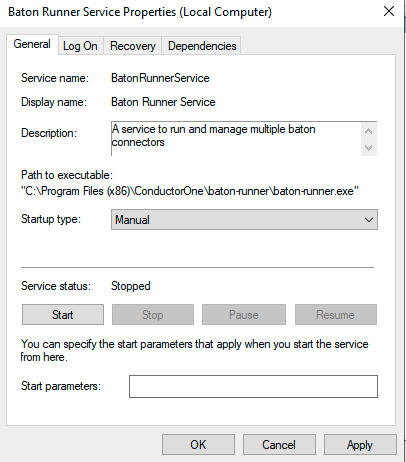
Services window showing baton-runner with Manual startup type
3
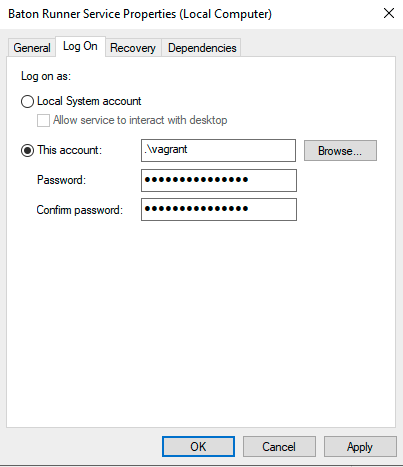
Open the baton-runner service properties and select the Log On tab. Set the service account to the user account you’ll use to store credentials in Windows Credential Manager. This must be the same account you’ll use in the wincred steps below.
Service properties Log On tab with user account selected

Set up connector files

1
Create a directory for the baton-sql-server executable. The directory path must not contain spaces.
2
Using File Explorer, navigate to C:\ProgramData\ConductorOne\baton-runner.
3
Create a YAML file for each SQL Server instance you want to sync, plus a config.yaml file for baton-runner. Name each connector file in a way that identifies the server it connects to.For this example, we’ll use sql1.yaml and sql2.yaml for two SQL Server instances.
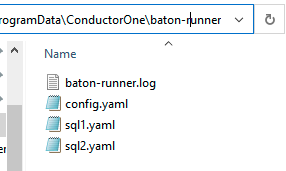
baton-runner directory containing sql1.yaml, sql2.yaml, and config.yaml
4
Open each connector YAML file in Notepad and add the following, replacing the values with the connection string and ConductorOne credentials for that instance:
BATON_DSN: server=192.168.1.40;user id=sa;password=YOUR_PASSWORD;port=1434
BATON_CLIENT_ID: YOUR_CLIENT_ID
BATON_CLIENT_SECRET: YOUR_CLIENT_SECRET

Store credentials in Windows Credential Manager

Baton-runner uses Windows Credential Manager (wincred) to store connector secrets securely on the server.
1
Open PowerShell as administrator. Right-click the Windows logo and select Windows PowerShell (Admin).
2
Change to the baton-runner directory:
cd C:\ProgramData\ConductorOne\baton-runner\
3
Store the credentials for each connector using the wincred set command:
& "C:\Program Files (x86)\ConductorOne\baton-runner\baton-runner.exe" wincred set sql1 sql1.yaml
& "C:\Program Files (x86)\ConductorOne\baton-runner\baton-runner.exe" wincred set sql2 sql2.yaml
Each command should return successfully set secret.
4
Verify the credentials are stored. Run:
cmdkey /list
You should see an entry for each connector:
Currently stored credentials:

    Target: LegacyGeneric:target=sql2
    Type: Generic
    Local machine persistence

    Target: LegacyGeneric:target=sql1
    Type: Generic
    Local machine persistence
You can also verify a specific credential using baton-runner:
& "C:\Program Files (x86)\ConductorOne\baton-runner\baton-runner.exe" wincred get sql1

Configure baton-runner

1
Open config.yaml in C:\ProgramData\ConductorOne\baton-runner and add the following configuration, updating the paths and names to match your setup:
connectors:
  - name: sql1
    path: C:\baton-sql\baton-sql-server.exe
    config:
      envFrom:
        secrets:
          BATON_DSN: sql1:BATON_DSN
          BATON_CLIENT_ID: sql1:BATON_CLIENT_ID
          BATON_CLIENT_SECRET: sql1:BATON_CLIENT_SECRET
  - name: sql2
    path: C:\baton-sql\baton-sql-server.exe
    config:
      envFrom:
        secrets:
          BATON_DSN: sql2:BATON_DSN
          BATON_CLIENT_ID: sql2:BATON_CLIENT_ID
          BATON_CLIENT_SECRET: sql2:BATON_CLIENT_SECRET
secrets:
  wincred:
    secrets:
      sql1: sql1
      sql2: sql2
2
Test the configuration by running baton-runner from PowerShell. Press Ctrl+C to stop it once you’ve confirmed it starts without errors:
& "C:\Program Files (x86)\ConductorOne\baton-runner\baton-runner.exe" -c .\config.yaml

Start and validate the service

1
Reboot the server. This confirms that the wincred credentials persist across reboots and completes post-installation steps for the service.
2
After rebooting, confirm your credentials are still present:
cmdkey /list
3
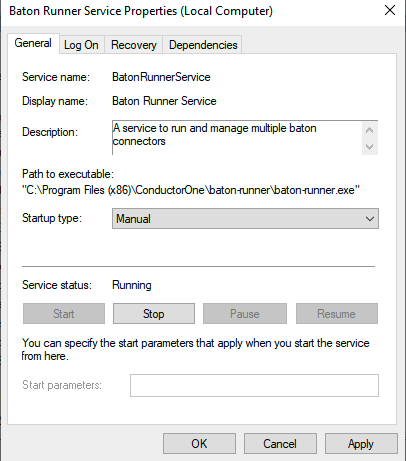
Open Services, find baton-runner, and click Start. Confirm the status changes to Running.
Services window showing baton-runner with Running status
4
Check the log for errors:
C:\ProgramData\ConductorOne\baton-runner\baton-runner.log
5
In ConductorOne, confirm the connectors are syncing. Navigate to each connector and verify data is appearing.
6
Once syncing is confirmed, change the baton-runner service startup type to Automatic.
7
Restart the server one final time to confirm the service starts automatically and all connectors sync successfully.
8
After confirming baton-runner starts successfully and both connectors sync, delete or securely clear the connector YAML files (sql1.yaml, sql2.yaml) immediately. These files contain plaintext credentials and are no longer needed once secrets are stored in wincred.